
Workout history / SugarWOD → Morph
Bring your SugarWOD
history to Morph.
Export your SugarWOD workouts, then forward the CSV to our team. We’ll handle the import.
-
Open your SugarWOD profile.
Start in a web browser. Sign in to the SugarWOD website with your usual email and password. Then open your athlete profile and select the Profile tab.
Open SugarWOD profile (opens in a new tab) -
Request your workout export.
Choose Export Workouts beneath All-Time Stats on the right side of your profile. SugarWOD will email your export to the address on your SugarWOD account.
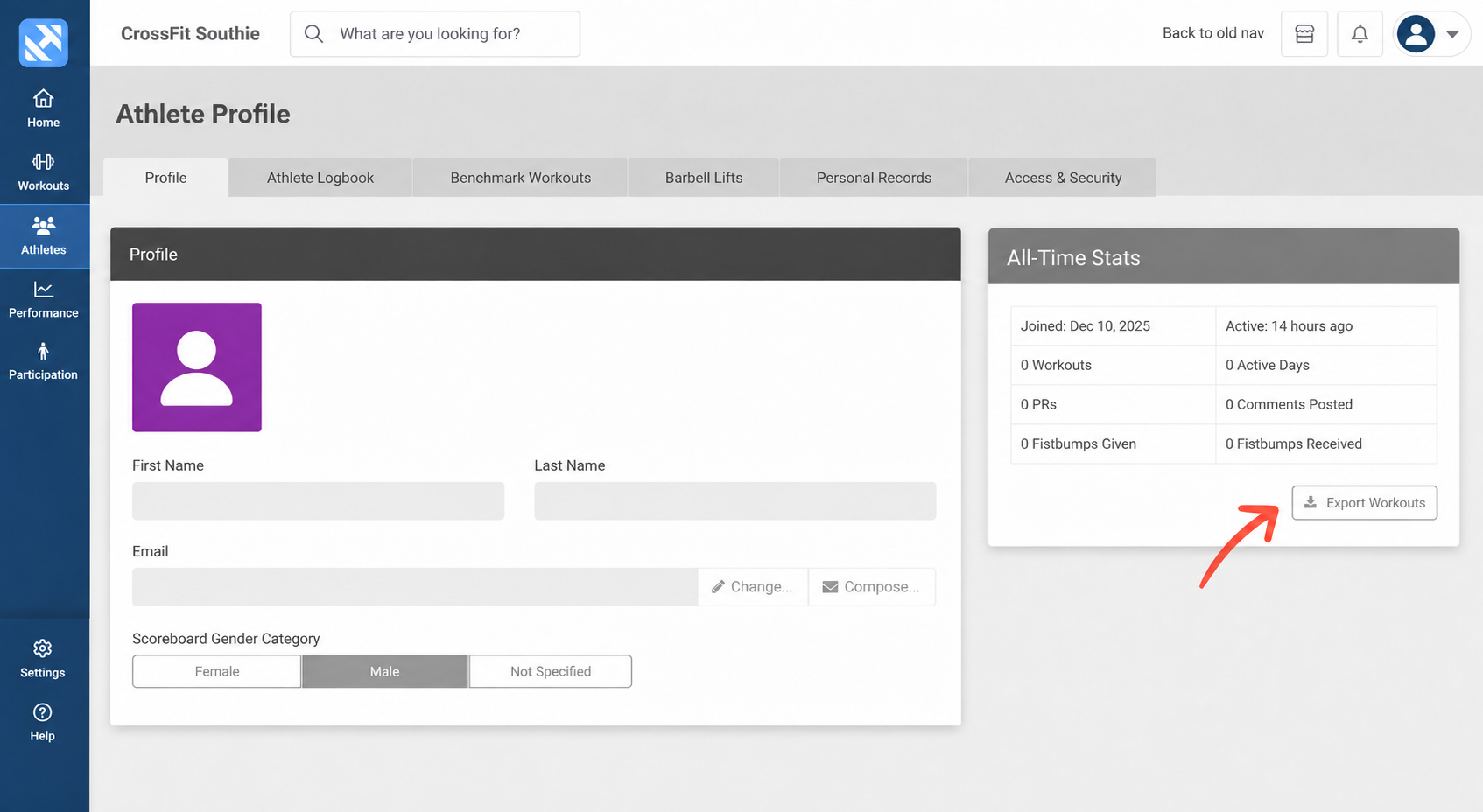
Look for Export Workouts under All-Time Stats. Tap the image to view the full profile. Check your inbox for the export. The CSV is usually named workouts.csv. If the email includes a download link, save the file first.
-
Forward the CSV to Morph.
Forward the SugarWOD email with the CSV attached, or attach the downloaded file to a new email. Send the original export as it is—we’ll take care of preparing it for Morph.
Send your export to
morph@odysseylabs.comInclude your name and the email you use for Morph so we can match the history to your account.
Once you’ve sent it, our team will handle the import into your Morph account.